
In my first post about TypeSafe and Jev in .NET, I used the SDK to make structured judgments about text and JSON: Noul for a yes-or-no probability, Choice for an unordered selection, and Score for an ordinal rubric. In the follow-up about the MCP server, I showed how to make those same judgments available to an AI coding agent.
TypeSafe’s JavaScript SDK v0.7.0 adds experimental image input and a box question type. “I” ported those features to my community .NET SDK in its own 0.7.0 update. The version numbers match, but these are separate releases: TypeSafe published the JavaScript SDK v0.7.0 on October 14, 2026, while the .NET SDK remains an unofficial community port.
From text judgments to image judgments with Jev
The System One request still has the same shape: provide a state, ask one or more typed questions, and read the typed answers. Now an image can be part of the state or question content, and a Box question can return a location in that image.
The upstream JavaScript SDK uses helpers such as image(...) and box(...). Image input is experimental and requires the explicit TypeSafe-Danger-Zone-Images: true header. The .NET port follows the same approach with C# types and factories: Image, TextWithAssets, Questions.Box(...), and BoxAnswer.
These additions do not replace the existing primitives. Noul, Choice, and Score remain the right tools for binary judgments, unordered choices, and ordered rubrics. Box adds a spatial answer for questions about where a described target appears in an image.
C# example: find an object in an image
Here is the basic shape with the current .NET SDK API:
using TypeSafe;

using var client = new TypeSafeClient(new TypeSafeClientOptions
{
    ApiKey = "your-api-key",
    DefaultHeaders = new Dictionary<string, string>
    {
        ["TypeSafe-Danger-Zone-Images"] = "true"
    }
});

var image = new Image(await File.ReadAllBytesAsync("photo.jpg"));

var result = await client.SystemOneAsync(new SystemOneRequest
{
    State = new { description = "A product photo submitted with a support ticket." },
    Model = "jev-preview",
    Questions = new Dictionary<string, Question>
    {
        ["damaged_area"] = Questions.Box(
            TextWithAssets.Create($"Locate the damaged area in {image}."))
    }
});

var answer = (BoxAnswer)result.Answers["damaged_area"];
var box = answer.Box;

Console.WriteLine(
    $"top={box.Top}, bottom={box.Bottom}, left={box.Left}, right={box.Right}");
Console.WriteLine($"confidence={answer.Confidence?.ToString() ?? "not reported"}");
The example opts in through TypeSafeClientOptions.DefaultHeaders, reads the image bytes into an Image, and uses TextWithAssets.Create for a string that embeds the image reference. That last step matters: ordinary string interpolation does not tell the SDK that the image is an attached asset. TextWithAssets.Create captures it so the SDK can serialize the reference and upload the bytes with the request.
The SDK accepts PNG and JPEG images; it rejects other formats, including WebP and GIF. You can also create an image from base64 with Image.FromBase64(...) using plain base64 text, not a data URL. Image data can also appear in nested state, instructions, or criteria. The port copies the bytes when it constructs an Image, so each object holds its own in-memory data.
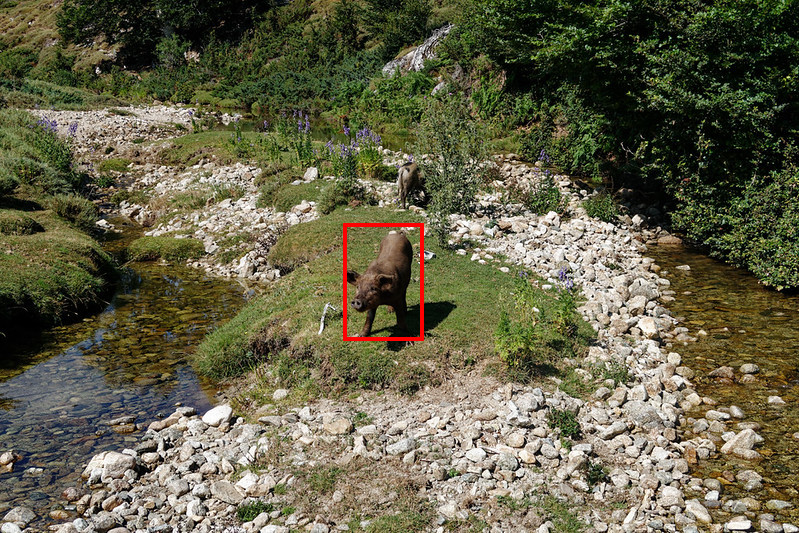
Model: jev-1.14.0
pig: top=0.42, bottom=0.64, left=0.43, right=0.53, confidence=91.0%
It works! Even if the second one was missed, the bounding box correctly identifies one of the pigs in the image.
You can also combine questions
    var questions = new Dictionary<string, Question>
    {
        ["waterfallpresent"] = Questions.Noul(
            TextWithAssets.Create($"Does the image {photo} contain a water fall."),
            new NoulCriteria
            {
                True = "The image contain a waterfall.",
                False = "The image does not contain a waterfall.",
            }),
        ["waterfall"] = Questions.Box(TextWithAssets.Create($"Locate any water fall visible in {photo}."))
    };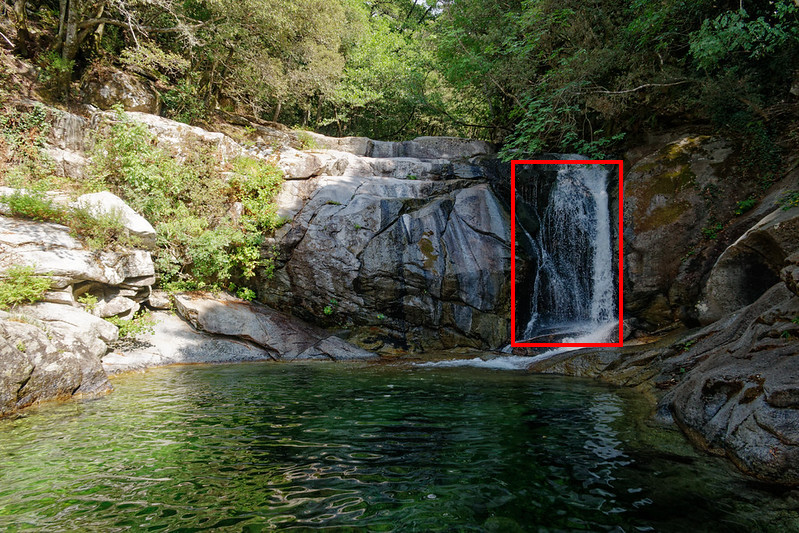
Model: jev-1.14.0
waterfallpresent: 0.98
waterfall: top=0.3, bottom=0.65, left=0.64, right=0.78, confidence=78.0%
We can see that Jev has correctly identified the presence of a waterfall with high confidence and has provided the normalized bounding box coordinates for its location in the image, also with quite reasonable confidence.
Reading normalized bounding box answers
BoxAnswer.Box contains Top, Bottom, Left, and Right. These are normalized coordinates: vertical edges are fractions of the image height, and horizontal edges are fractions of its width, all in the range from zero to one. They describe the box edges, not pixel positions. To convert an edge to pixels in your application, multiply the vertical fractions by the image height and the horizontal fractions by its width.
BoxAnswer.Confidence is nullable because the API may not report confidence. Treat null as “not provided,” not as zero. The same applies to Usage.InputTokens and Usage.OutputTokens, which are nullable in the updated SDK because the API may omit usage counts.
There is a practical caveat in the current TypeSafe Box documentation: Box returns a box even when the target is absent. If absence matters to your workflow, do not treat a returned rectangle as proof that the object is present. Pair the location question with a separate Noul presence check, then have your application decide what to do if the results disagree or remain uncertain. This guidance comes from the current Box documentation, not from the v0.7.0 release notes. See my previous example.
How the .NET SDK sends images: multipart requests
When a request includes an image, the .NET SDK sends it as multipart form data. The JSON request and image bytes go in separate parts, and the SDK manages the parts and asset references. Without image assets, the request remains ordinary JSON.
This matters if you inspect HTTP logs or use a custom HttpMessageHandler: image-bearing calls are not just JSON with a base64 string added. The SDK handles the transport details, so at the call site you work with Image and TextWithAssets.
The header is an explicit opt-in, not a default. Since images are experimental, I would enable it only for the client or calls that need vision. Treat the feature as something to prototype and evaluate, not as a production guarantee.
Request compression and validation in the .NET port
The .NET port also compresses large requests automatically. Compression is enabled by default for request bodies of at least 1,024 UTF-8 bytes and uses .NET 11’s built-in ZstandardStream, so no additional compression package is needed. Set Compression = false in TypeSafeClientOptions to turn it off.
The port also follows the upstream update’s stricter request validation. For example, a request needs a non-null state and at least one question. A Noul question needs instructions or at least one described outcome. The SDK rejects invalid requests before sending an HTTP request. Because the method is asynchronous, the call returns a faulted task rather than throwing synchronously before returning it. Be sure to await the call and handle validation errors in the usual async flow.
What changed in the .NET SDK, and what did not
The .NET SDK README now identifies the library as a port of the upstream JavaScript SDK v0.7.0. The update adds image assets, asset-aware text, Box questions and answers, nullable usage counts, stricter validation, and zstd compression. It remains an unofficial, community-maintained port, not a TypeSafe-supported .NET SDK. It targets .NET 11 and C# 15, and image and Box capabilities remain experimental.
The MCP server remains text- and JSON-oriented. Its tools do not expose image upload or Box questions, so use the direct .NET SDK for vision requests.
Keeping the .NET port aligned with upstream
This update also adds an upstream pin and drift check, as I am porting it using AI agents, I wanted to automate inspection of upstream changes. The .NET repository records the upstream v0.7.0 tag and commit in upstream.json, and maps upstream source files to the .NET files that need review. A PowerShell comparison script produces Markdown and JSON reports. Its check mode exits with an error when it detects upstream drift. A GitHub Actions workflow can run the comparison weekly or on manual dispatch and publishes the report as a workflow artifact.
The check is a review aid, not an automatic port. It does not silently change the pinned version or rewrite the C# implementation. Each upstream change still needs deliberate review and a corresponding .NET implementation.
I like that image input extends the same pattern I used for text: Jev answers a narrow question, and C# code decides what to do with the result.
Where could that fit in your .NET application?
You can get all the code on GitHub

References
- TypeSafe JavaScript SDK v0.7.0 release notes
- TypeSafe JavaScript SDK README at v0.7.0
- My unofficial TypeSafe .NET SDK repository
- TypeSafe Images documentation
- TypeSafe Box documentation
- TypeSafe’s Jev AI Model in .NET: A Community SDK for Structured AI Output in C#
- Building a TypeSafe Jev MCP server with .NET