
A few years ago, I wrote about how ReSharper’s Search with Pattern feature helped me refactor a massive C# codebase in minutes. The technique was powerful, but creating those custom search and replace patterns meant using ReSharper to define them. Alternatively, you could hand-craft XML in DotSettings files—tedious work that required memorizing the exact structure, generating GUIDs, and configuring placeholder properties correctly.
Recently, I explored how Agent Skills are becoming an open standard that works across different AI coding assistants like GitHub Copilot, Cursor, and JetBrains Junie. This got me thinking: what if I could combine these two powerful developer tools? What if an Agent Skill could automate the tedious part of creating ReSharper and Rider patterns?
This post shows how I built exactly that—a practical Agent Skill that generates properly formatted DotSettings XML for custom search and replace patterns in Rider and ReSharper, just by describing what you want in natural language to your AI coding assistant.
The Challenge: DotSettings XML Configuration is Complex
Back in 2023, when I needed to refactor thousands of lines of legacy C# code, ReSharper’s structural search and replace was a lifesaver. I could define Rider patterns like “find all old-style null checks and replace them with modern ArgumentNullException.ThrowIfNull” and apply them across the entire codebase.
The catch? I am using Rider, and creating these patterns meant first running Visual Studio with ReSharper, manually defining the pattern in the UI, and then exporting the DotSettings XML to share with my team. If I wanted to create or modify patterns without opening Visual Studio, I had to hand-write the XML in DotSettings files. This was a nightmare.
Each custom ReSharper pattern required manually creating XML entries in a DotSettings file. Here’s what a simple Rider search and replace pattern looks like:
<wpf:ResourceDictionary xml:space="preserve"
    xmlns:x="http://schemas.microsoft.com/winfx/2006/xaml"
    xmlns:s="clr-namespace:System;assembly=mscorlib"
    xmlns:ss="urn:shemas-jetbrains-com:settings-storage-xaml"
    xmlns:wpf="http://schemas.microsoft.com/winfx/2006/xaml/presentation">

    <s:String x:Key="/Default/PatternsAndTemplates/StructuralSearch/Pattern/=ABC123/@EntryIndexedValue">
        Replace old null check
    </s:String>

    <s:String x:Key="/Default/PatternsAndTemplates/StructuralSearch/Pattern/=ABC123/SearchPattern/@EntryIndexedValue">
        if ($param$ == null) throw new ArgumentNullException(nameof($param$));
    </s:String>

    <s:String x:Key="/Default/PatternsAndTemplates/StructuralSearch/Pattern/=ABC123/ReplacePattern/@EntryIndexedValue">
        ArgumentNullException.ThrowIfNull($param$);
    </s:String>

    <s:Boolean x:Key="/Default/PatternsAndTemplates/StructuralSearch/Pattern/=ABC123/MatchSimilarConstructs/@EntryIndexedValue">
        True
    </s:Boolean>

    <s:String x:Key="/Default/PatternsAndTemplates/StructuralSearch/Pattern/=ABC123/Severity/@EntryIndexedValue">
        WARNING
    </s:String>

    <!-- Plus more entries for placeholders, descriptions, etc. -->
</wpf:ResourceDictionary>
And this is a simple ReSharper pattern! If you need placeholders with type constraints, minimum/maximum occurrence counts, or regex matching, the DotSettings XML gets even more complex. You need to:
- Generate a unique GUID for each Rider pattern
- Know the exact XML key paths for different ReSharper configuration options
- Understand placeholder types (Identifier, Expression, Statement, Type, Argument)
- Remember the severity levels (DO_NOT_SHOW, HINT, SUGGESTION, WARNING, ERROR)
- Get the XML structure perfect—one typo and Rider won’t load it
After creating a few ReSharper patterns manually, I’d inevitably make mistakes. Wrong GUID format. Forgot to configure a placeholder property. Used the wrong severity key. It was frustrating because the idea was simple, but the implementation was error-prone.
The Solution: An Agent Skill for AI Coding Assistants
With Agent Skills now an open standard that works across different AI coding assistants like GitHub Copilot, and Junie, I realized this was the perfect use case. I could use some of my DotSettings as examples to create an Agent Skill, and then simply describe Rider patterns in natural language to my AI assistant:
“Create a Rider pattern to replace Assert.That(count, Is.EqualTo(0)); with Assert.That(count, Is.Zero); and show it as an error message.”
The AI coding agent, armed with the Agent Skill, would generate the correct DotSettings XML automatically. No more looking up the ReSharper schema, no more GUID typos, no more forgetting placeholder configurations.
Building the Agent Skill for Rider Pattern Generation
An Agent Skill is a specialized instruction set that lives in a markdown file. When you mention certain keywords or the skill name, the AI agent loads the skill and follows its instructions. This makes Agent Skills perfect for automating complex, domain-specific tasks like generating Rider and ReSharper configuration XML.
I used the Anthropic Agent Skill skill-creator to build this skill, passing two example of search and replace patterns I had created manually and added my team DotSettingss for more examples.
It created an Agent Skill called rider-ssr-config with this structure:
rider-ssr-config/
├── SKILL.md        # Main skill file with instructions
└── references/
    └── schema.md   # DotSettings Structural Search XML Schema
└── dist/
    └── rider-ssr-config.skill   # Compiled skill file
The Agent Skill Definition: SKILL.md
Here’s the complete Agent Skill definition for generating Rider and ReSharper patterns:
---
name: rider-ssr-config
description: >
Generate Rider/ReSharper Structural Search and Replace (SSR) XML configuration for DotSettings files.
Use this skill when the user wants to create a structural search pattern, a search-and-replace pattern,
or custom code inspection rules for Rider, ReSharper, or IntelliJ IDEA in the DotSettings XML format.
Handles placeholder definitions (Expression, Type, Identifier, Argument, Statement), severity levels,
and all pattern options. Outputs ready-to-paste XML — does NOT modify any project files.
---
# Rider Structural Search & Replace Configuration Generator
Generate DotSettings XML for Rider/ReSharper Structural Search and Replace patterns. Output XML to the chat — never modify project files.
## Workflow
1. Gather pattern details from the user (search pattern, optional replace pattern, placeholders, options).
2. Generate a GUID for the pattern (uppercase hex, 32 chars, no hyphens).
3. Build the XML lines following the schema in [references/schema.md](references/schema.md).
4. Present the XML in a fenced code block with guidance on where to paste it.
## Gathering Input
Ask for or infer from context:
- **Search pattern** (required): C# code with `$name$` placeholders. Example: `$args$.State = $value$;`
- **Replace pattern** (optional): if provided, generates a replace pattern. Example: `$args$.SetState($value$);`
- **Placeholders**: for each `$name$` in the patterns, determine the type and properties. See [references/schema.md](references/schema.md) for all placeholder types.
- **Options** (all optional, have defaults):
- `Severity`: ERROR (default), WARNING, SUGGESTION, HINT, DO_NOT_SHOW
- `Comment` / `ReplaceComment`: description shown in the inspection list
- `SuppressionKey`: custom key for `// ReSharper disable` comments
- `FormatAfterReplace`: default False
- `ShortenReferences`: default False (omitted when default)
- `MatchCatchClauseWithoutExceptionFilter`: default False
- `LanguageName`: CSHARP (default), VBASIC, or others
## Generating the XML
Read [references/schema.md](references/schema.md) for the full XML schema, placeholder types, property details, and encoding rules.
Key rules:
- Generate a random 32-character uppercase hex GUID (no hyphens) for each pattern.
- XML-encode `<` as `<`, `>` as `>`, `&` as `&` in SearchPattern, ReplacePattern, and placeholder property values.
- Only emit `IsReplacePattern`, `ReplacePattern`, `FormatAfterReplace`, `ShortenReferences`, and `MatchCatchClauseWithoutExceptionFilter` when a replace pattern is provided.
- Always emit `@KeyIndexDefined` as the first line.
- Emit placeholder lines grouped per placeholder, after all pattern-level lines.
- For search-only patterns (no replace), emit: `@KeyIndexDefined`, `Comment` (if provided), `LanguageName`, `SearchPattern`, `Severity`, and placeholder blocks.
## Output Format
Present the XML inside a fenced XML code block. Add a brief note:
> Paste this XML into your `.DotSettings` file (team-shared or personal) inside the root `<wpf:ResourceDictionary>` element, alongside other `PatternsAndTemplates/StructuralSearch` entries.Note the YAML frontmatter at the top (delimited by ---) with name and description fields—this is required by the Agent Skills specification. The name field uses lowercase-with-hyphens format per the spec.
The Reference File
The references/schema.md file contains detailed examples of different placeholder configurations, complex Rider patterns, and edge cases. This gives the AI coding assistant comprehensive reference material when it needs to handle more advanced ReSharper scenarios.
Using the Agent Skill with JetBrains Junie and Other AI Assistants
Once the Agent Skill is in place, using it with your AI coding assistant is incredibly simple. Here’s a real example with Junie:
Me: “Hey, I need a Rider pattern to catch usage Assert.That(count, Is.EqualTo(0)); with Assert.That(count, Is.Zero); and show it as a warning message.
Junie (with the Agent Skill loaded):
<wpf:ResourceDictionary xml:space="preserve"
    xmlns:x="http://schemas.microsoft.com/winfx/2006/xaml"
    xmlns:s="clr-namespace:System;assembly=mscorlib"
    xmlns:ss="urn:shemas-jetbrains-com:settings-storage-xaml"
    xmlns:wpf="http://schemas.microsoft.com/winfx/2006/xaml/presentation">

  <s:Boolean x:Key="/Default/PatternsAndTemplates/StructuralSearch/Pattern/=05F62B00505742A9B05E039DB46B798A/@KeyIndexDefined">
    True
  </s:Boolean>
  <s:String x:Key="/Default/PatternsAndTemplates/StructuralSearch/Pattern/=05F62B00505742A9B05E039DB46B798A/Comment/@EntryValue">
    Prefer Assert.That(x, Is.Zero) to Assert.That(x, Is.EqualTo(0))
  </s:String>
  <s:Boolean x:Key="/Default/PatternsAndTemplates/StructuralSearch/Pattern/=05F62B00505742A9B05E039DB46B798A/FormatAfterReplace/@EntryValue">
    False
  </s:Boolean>
  <s:Boolean x:Key="/Default/PatternsAndTemplates/StructuralSearch/Pattern/=05F62B00505742A9B05E039DB46B798A/IsReplacePattern/@EntryValue">
    True
  </s:Boolean>
  <s:String x:Key="/Default/PatternsAndTemplates/StructuralSearch/Pattern/=05F62B00505742A9B05E039DB46B798A/LanguageName/@EntryValue">
    CSHARP
  </s:String>
  <s:Boolean x:Key="/Default/PatternsAndTemplates/StructuralSearch/Pattern/=05F62B00505742A9B05E039DB46B798A/MatchCatchClauseWithoutExceptionFilter/@EntryValue">
    False
  </s:Boolean>

  <!-- Pattern Definition -->
  <s:String x:Key="/Default/PatternsAndTemplates/StructuralSearch/Pattern/=05F62B00505742A9B05E039DB46B798A/ReplaceComment/@EntryValue">
    Prefer Assert.That(x, Is.Zero) to Assert.That(x, Is.EqualTo(0))
  </s:String>

  <!-- Replace Pattern -->
    <s:String x:Key="/Default/PatternsAndTemplates/StructuralSearch/Pattern/=05F62B00505742A9B05E039DB46B798A/ReplacePattern/@EntryValue">
    Assert.That($expr$, Is.Zero);
  </s:String>

  <!-- Search Pattern -->
  <s:String x:Key="/Default/PatternsAndTemplates/StructuralSearch/Pattern/=05F62B00505742A9B05E039DB46B798A/SearchPattern/@EntryValue">
    Assert.That($expr$, Is.EqualTo(0));
  </s:String>

  <s:String x:Key="/Default/PatternsAndTemplates/StructuralSearch/Pattern/=05F62B00505742A9B05E039DB46B798A/Severity/@EntryValue">
    WARNING
  </s:String>
  <s:Boolean x:Key="/Default/PatternsAndTemplates/StructuralSearch/Pattern/=05F62B00505742A9B05E039DB46B798A/ShortenReferences/@EntryValue">
    False
  </s:Boolean>
  <s:Boolean x:Key="/Default/PatternsAndTemplates/StructuralSearch/Pattern/=05F62B00505742A9B05E039DB46B798A/CustomPatternPlaceholder/=expr/@KeyIndexDefined">
    True
  </s:Boolean>
  <s:String x:Key="/Default/PatternsAndTemplates/StructuralSearch/Pattern/=05F62B00505742A9B05E039DB46B798A/CustomPatternPlaceholder/=expr/Properties/=ExactType/@EntryIndexedValue">
    False
  </s:String>
  <s:String x:Key="/Default/PatternsAndTemplates/StructuralSearch/Pattern/=05F62B00505742A9B05E039DB46B798A/CustomPatternPlaceholder/=expr/Properties/=ExpressionType/@EntryIndexedValue">
  </s:String>
  <s:String x:Key="/Default/PatternsAndTemplates/StructuralSearch/Pattern/=05F62B00505742A9B05E039DB46B798A/CustomPatternPlaceholder/=expr/Type/@EntryValue">
    ExpressionPlaceholder
  </s:String>

</wpf:ResourceDictionary>
The Agent Skill generated the complete DotSettings XML for this Rider pattern:
- Unique GUIDs in the correct format
- Proper XML structure for ReSharper
- Appropriate severity and helpful descriptions
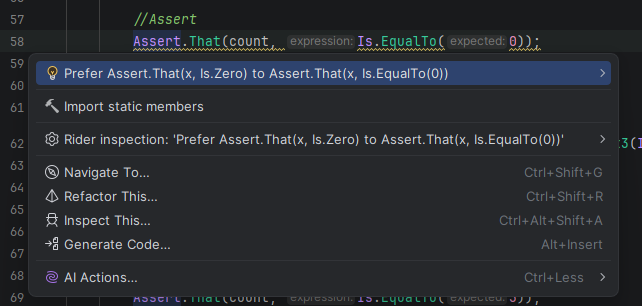
Junie even updated it directly into my team’s shared MySolution.sln.DotSettings file, and everyone on the team immediately gets the Rider pattern. ReSharper and Rider will start showing warnings wherever old-style Assert.That(expr, Is.EqualTo(0)); calls are used, with a quick-fix to automatically apply the replacement.
What was really cool, when Junie finished the XML generation, the code was highlighted with squiggly lines immediately.
Where to Store Your Agent Skills
Agent Skills can live in different locations depending on their scope:
Project-Level Agent Skills
For JetBrains Junie in Rider specific to a project, create:
.junie/skills/rider-ssr-config/SKILL.mdThis works also with GitHub Copilot, or CLI:
.github/skills/rider-ssr-config/SKILL.mdUser-Level Agent Skills
For Agent Skills you want available across all your .NET projects:
~/.junie/skills/rider-ssr-config/SKILL.mdI keep this Rider pattern generation skill at the user level since I use it across multiple C# projects.
Enforcing Rider Patterns in CI/CD Pipelines
One of the most powerful aspects of ReSharper patterns in DotSettings files is that they’re not just IDE configuration—you can enforce them in your CI/CD pipeline using JetBrains’ InspectCode command-line tool.
This means:
- Define your Rider and ReSharper patterns once using the Agent Skill
- Share them via the team DotSettings file in version control
- Enforce them in pull request builds with InspectCode
If someone tries to merge C# code that violates a WARNING or ERROR pattern, the CI build fails. Combined with the Agent Skill making pattern creation trivial, this becomes a powerful way to codify and enforce team conventions for .NET development.
Cross-Tool Portability: Agent Skills Work Everywhere
The beauty of Agent Skills as an open standard is that this same skill works across different AI coding assistants:
- JetBrains Junie: Works with the same Agent Skills format
- GitHub Copilot: Works today in VS Code, GitHub Copilot CLI, and other IDEs
- …
Write the Agent Skill once, use it with any AI coding assistant. This is the promise of an open standard, and it’s already delivering value for .NET developers using Rider and ReSharper.
Key Lessons from Building This Agent Skill
Building this Agent Skill for Rider pattern generation taught me a few things:
Agent Skills excel at domain-specific knowledge. The DotSettings XML format for ReSharper is complex and poorly documented. Encoding it in an Agent Skill means I never have to look it up again, and my AI coding assistant always generates correct XML.
Reference files are essential. For complex formats like DotSettings, splitting the Agent Skill into a concise SKILL.md and detailed REFERENCE.md works well. The AI assistant can consult the reference when needed without cluttering the main instructions.
Examples matter. Including example interactions in the Agent Skill helps the AI coding assistant understand the expected input/output format for Rider patterns.
Agent Skills compose. I can imagine combining this with other Agent Skills—perhaps one that analyzes existing C# code to suggest ReSharper patterns, or one that tests Rider patterns before committing them to DotSettings.
Conclusion: A Trilogy Complete
This Agent Skill completes a trilogy of sorts:
- 2023: I presented the power of ReSharper structural search and replace for large-scale refactoring
- 2026: I explored Agent Skills as a portable standard for AI assistants
- Today: I combined them to automate the tedious parts while keeping the power
The result is something genuinely useful for .NET developers. Creating custom ReSharper patterns went from “I need to open Visual Studio with R# or look up the XML format again” to “just describe what I want to my AI coding assistant.” The AI agent handles the DotSettings XML generation, GUID creation, and placeholder configuration. I focus on the what (the refactoring I want) instead of the how (the XML structure).
If you’re using Rider or ReSharper and haven’t explored custom search and replace patterns, I highly recommend it. And if you are using them, I hope this Agent Skill makes creating new Rider patterns as painless as it should have been from the start.
You can find the complete Agent Skill implementation in my GitHub repository. Happy prompting!

What kind of search and replace patterns would you create with this Agent Skill? Let me know in the comments!
References
- Refactoring huge C# code base in minutes — My original post on ReSharper structural search
- Agent Skills: From Claude to Open Standard — How Agent Skills became portable
- Agent Skills Specification — The open standard specification
- ReSharper Command Line Tools — Documentation on InspectCode for CI integration