
If you’ve been working with C# since the introduction of null-conditional operators in C# 6.0, you’ve likely appreciated how ?. and ?[] simplified null-checking when reading values. But what about writing values conditionally? That’s where C# 14’s null-conditional assignment comes in—and it’s a nice improvement for modern C# development.
The Problem: Verbose Null Checks Before Assignment
We’ve all written code like this:
if (customer is not null)
{
    customer.Order = GetCurrentOrder();
}

if (values is not null)
{
    values[2] = GenerateNextIndex();
}

if (person is not null)
{
    person.FirstName = "Scott";
}
This isn’t terrible code, but it’s repetitive. We’re following the same pattern: check for null, then assign. The asymmetry has always been frustrating—we could use ?. to read values conditionally, but not to write them.
The Solution: C# 14 Null-conditional Assignment Operator
C# 14, released in November 2025, extends the null-conditional operators to work on the left-hand side of assignments. Now you can write:
customer?.Order = GetCurrentOrder();
values?[2] = GenerateNextIndex();
person?.FirstName = "Scott";
Clean, concise, and consistent with the null-conditional operators you already know.
How Null-conditional Assignment Works: Short-Circuit Evaluation
The key feature of null-conditional assignment is its short-circuit behavior: the right-hand side expression evaluates only when the left-hand side is non-null. This isn’t just syntactic sugar—it has real implications:
customer?.Order = GetCurrentOrder(); // GetCurrentOrder() called only if customer isn't nullIf customer is null, GetCurrentOrder() never executes. This prevents unnecessary side effects in your C# applications.
Beyond Simple Assignment: Compound Assignment Operators
Null-conditional assignment works seamlessly with compound assignment operators like +=, -=, and *=:
inventory?.StockLevel += restockAmount;
account?.Balance -= withdrawalAmount;
statistics?.PageViews *= scalingFactor;
Each operation executes only when the target object is non-null, making your code both safer and more expressive.
Chaining Null-conditional Operators: Deep Object Graph Safety
One of the most powerful capabilities is chaining multiple null-conditional operators:
company?.Department?.Manager?.Assistant = newAssistant;This assigns newAssistant only if company, Department, and Manager are all non-null. No more nested if statements or complex null-checking logic.
You can even combine it with the null-coalescing assignment operator (??=):
config?.Settings ??= GetDefaultSettings();This ensures config.Settings has a value—but only if config itself is non-null.
Real-World C# 14 Usage Scenarios
Scenario 1: Updating Optional Configuration Properties
// Before C# 14
if (appConfig is not null && appConfig.UserPreferences is not null)
{
    appConfig.UserPreferences.Theme = "dark";
}

// With C# 14 null-conditional assignment
appConfig?.UserPreferences?.Theme = "dark";
Scenario 2: Conditional Event Handler Updates
// Before C# 14
if (eventBus is not null)
{
    eventBus.OnDataReceived += HandleDataReceived;
}

// With C# 14 null-conditional assignment
eventBus?.OnDataReceived += HandleDataReceived;
C# 14 Null-conditional Assignment Constraints and Limitations
While powerful, null-conditional assignment has deliberate limitations:
1. No Increment/Decrement Operators
counter?.Value++; // ❌ Not allowed
counter?.Value--; // ❌ Not allowed

// Use compound assignment instead:
counter?.Value += 1; // ✅ Works
The C# language designers excluded ++ and -- to avoid ambiguity about when the increment occurs.
2. No Ref Assignments
ref int value = ref obj?.Field; // ❌ Not allowedNull-conditional expressions can’t be used in ref contexts because they might evaluate to null, which can’t be a ref target.
3. No Deconstruction Assignment
(person?.FirstName, person?.LastName) = GetNames(); // ❌ Not allowedDeconstruction syntax isn’t supported with null-conditional assignment.
4. Reference Types Only
Null-conditional assignment works only with reference types, not value types:
struct Point { public int X; public int Y; }
Point? point = null;
point?.X = 10; // ❌ Not allowed - Point is a value type
One-Evaluation Guarantee (Not Thread Safety)
Null-conditional assignment ensures that the receiver expression is evaluated only once. This avoids repeated-evaluation bugs, especially when the expression has side effects:
var customer = GetCustomer();
customer?.Order = GetCurrentOrder();
Or, using the compact form:
GetCustomer()?.Order = GetCurrentOrder();In both cases, GetCustomer() is evaluated a single time. This prevents issues that could arise if the method returned different objects on repeated calls.
But it’s important to be precise: this does not make the assignment itself thread-safe — it only avoids double evaluation.
Practical Migration Tips for C# 14 Null-conditional Assignment
When migrating existing C# code to use null-conditional assignment:
-
Start with simple cases: Replace straightforward
if (x is not null)patterns first- Rider

- Visual Studio
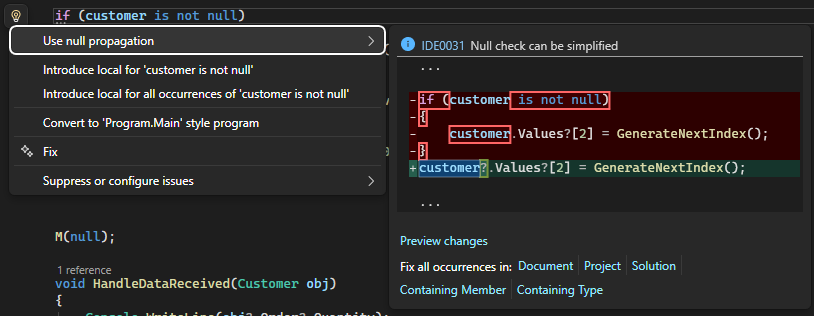
- Rider
-
Watch for side effects: Ensure you understand when right-hand expressions execute
-
Preserve readability: If a traditional null check is clearer in context, keep it
-
Test thoroughly: Especially when refactoring compound assignments or chained operations
Conclusion
Null-conditional assignment in C# 14 completes the null-conditional operator story that began in C# 6.0. It’s a natural extension that reduces boilerplate while maintaining C#‘s commitment to type safety and performance.
The feature excels in scenarios with optional properties, deep object graphs, and compound operations. Combined with nullable reference types from C# 8.0, C# now has a comprehensive toolkit for handling null safely and expressively.
Start experimenting with null-conditional assignment in your codebase—you’ll quickly find it becomes as indispensable as the original null-conditional operators. Your code will be cleaner, more concise, and just as safe.
Have you found creative uses for C# 14’s null-conditional assignment? I’d love to hear about them in the comments!