
C# 14 introduces the field keyword, a contextual keyword that reshapes how we write property accessors. This feature eliminates the need for explicit backing fields while maintaining full control over property logic. Let’s explore how this powerful addition simplifies C# code and improves developer productivity.
Introduction
Properties in C# have always been a cornerstone of the language, providing encapsulation and control over class members. However, developers have long faced a choice: use auto-implemented properties for simplicity or manually declare backing fields for custom logic. C# 14’s field keyword bridges this gap, offering a smooth migration path from auto-properties to properties with validation, transformation, or notification logic.
Released in November 2025 with .NET 10 support, the field keyword represents a compiler-synthesized backing field that’s automatically generated when you write custom property accessors. This means you can add validation to a setter or lazy initialization to a getter without the ceremony of declaring private string _myField; at the top of your class.
The Problem: Before C# 14
Before C# 14, adding validation or custom logic to a property required explicit backing field declaration. Here’s the traditional approach:
public class UserProfile
{
    private string _username;
    private int _age;

    public string Username
    {
        get => _username;
        set => _username = value?.Trim() ??
            throw new ArgumentNullException(nameof(value));
    }

    public int Age
    {
        get => _age;
        set => _age = value >= 0 ? value :
            throw new ArgumentOutOfRangeException(nameof(value));
    }
}
This pattern works but creates visual noise. The backing fields _username and _age clutter the class definition and increase the maintenance burden. Developers must ensure backing field names remain consistent, especially during refactoring.
The Solution: The Field Keyword
C# 14’s field keyword provides direct access to the compiler-generated backing field within property accessors:
public class UserProfile
{
    public string Username
    {
        get;
        set => field = value?.Trim() ??
            throw new ArgumentNullException(nameof(value));
    }

    public int Age
    {
        get;
        set => field = value >= 0 ? value :
            throw new ArgumentOutOfRangeException(nameof(value));
    }
}
The difference is striking. No more backing field declarations, yet we maintain complete control over property behavior. The compiler generates the backing field automatically, and field provides type-safe access to it within the accessor body.
Common Use Cases
Validation and Range Checking
The most common scenario is adding validation to property setters:
public class Product
{
    public decimal Price
    {
        get;
        set => field = value >= 0 ? value :
            throw new ArgumentOutOfRangeException(nameof(value),
                "Price must be non-negative");
    }

    public string Name
    {
        get;
        set => field = !string.IsNullOrWhiteSpace(value) ? value :
            throw new ArgumentException("Name cannot be empty", nameof(value));
    }
}
Null Checking
Enforce non-null constraints cleanly:
public class Configuration
{
    public string ConnectionString
    {
        get;
        set => field = value ??
            throw new ArgumentNullException(nameof(value));
    }
}
Lazy Initialization
Implement lazy initialization patterns without additional fields:
public class DataProcessor
{
    public string ProcessedData => field ??= ComputeExpensiveValue();

    private string ComputeExpensiveValue()
    {
        // Complex computation
        return "Computed result";
    }
}
Data Transformation
Transform data on assignment:
public class TextDocument
{
    public string Content
    {
        get;
        set => field = value.Trim();
    }

    public string Title
    {
        get;
        set => field = value.ToUpperInvariant();
    }
}
MVVM and INotifyPropertyChanged Patterns
The field keyword shines in MVVM scenarios, dramatically simplifying property change notification:
public sealed class SomeViewModel : INotifyPropertyChanged
{
    public string Name
    {
        get;
        set => Set(ref field, value);
    }

    public bool IsActive
    {
        get;
        set => Set(ref field, value);
    } = true;

    public event PropertyChangedEventHandler? PropertyChanged;

    private void OnPropertyChanged([CallerMemberName] string? propertyName = null) =>
        PropertyChanged?.Invoke(this, new PropertyChangedEventArgs(propertyName));

    private void Set<T>(ref T field, T value, [CallerMemberName] string? propertyName = null)
    {
        if (EqualityComparer<T>.Default.Equals(field, value)) return;
        field = value;
        OnPropertyChanged(propertyName);
    }
}
This pattern eliminates boilerplate backing fields while maintaining clean change tracking logic.
Technical Details
Contextual Keyword Behavior
The field keyword is contextual, meaning it only acts as a keyword within property accessor contexts. You can still have members named field elsewhere in your code:
public class Example
{
    // This is fine - 'field' as a regular member
    private int field = 42;

    public string Data
    {
        get;
        // 'field' here refers to the compiler-generated backing field
        set => field = value.Trim();
    }
}
If there’s ambiguity, use @field or this.field to disambiguate:
public class AmbiguousExample
{
    private string field = "member";

    public string Property
    {
        get;
        set
        {
            // Use @field for the backing field
            @field = value;
            // Use this.field for the member
            Console.WriteLine(this.field);
        }
    }
}
Field-Targeted Attributes
You can apply attributes directly to the compiler-generated backing field:
public class DataModel
{
    [field: NonSerialized]
    public string TemporaryData { get; set; }

    [field: JsonIgnore]
    public string InternalState { get; set; }
}
Property Initializers vs Constructor Assignments
An important distinction exists between property initializers and constructor assignments:
public class InitializationExample
{
    // Property initializer - directly initializes the backing field (setter not called)
    public string Name { get; set; } = "Default";

    public InitializationExample()
    {
        // Constructor assignment - calls the setter
        Name = "Initialized";
    }

    public InitializationExample(string name)
    {
        // This also calls the setter
        Name = name;
    }
}
Property initializers bypass the setter logic, directly initializing the backing field. Constructor assignments go through the setter, triggering any validation or transformation logic.
We can see this behavior in action using Low-Level C#:
[NullableContext(1)]
[Nullable(0)]
public class InitializationExample
{
  [CompilerGenerated]
  [DebuggerBrowsable(DebuggerBrowsableState.Never)]
  // Generated backing field for Name property
  private string <Name>k__BackingField;

  public string Name
  {
    [CompilerGenerated] get
    {
      return this.<Name>k__BackingField;
    }
    [CompilerGenerated] set
    {
      this.<Name>k__BackingField = value;
    }
  }

  public InitializationExample()
  {
    // Property initializer - directly initializes the backing field (setter not called)
    this.<Name>k__BackingField = "Default";
    base..ctor();
    // Constructor assignment - calls the setter
    this.Name = "Initialized";
  }

  public InitializationExample(string name)
  {
    // Property initializer - directly initializes the backing field (setter not called)
    this.<Name>k__BackingField = "Default";
    base..ctor();
        // This also calls the setter
    this.Name = name;
  }
}
Lambda Capture and Local Functions
The field keyword can be captured in lambdas and local functions:
public class EventExample
{
    public string Status
    {
        get;
        set
        {
            field = value;
            // Capture field in lambda
            Task.Run(() => LogStatusChange(field));
        }
    }

    private void LogStatusChange(string status) { }
}
Expression-Bodied Properties
The field keyword works seamlessly with expression-bodied property syntax:
public class ExpressionExample
{
    public string NormalizedName
    {
        get => field;
        set => field = value.ToLowerInvariant().Trim();
    }

    // Or using expression body for getter only
    public string DisplayName => field.ToUpperInvariant();
}
Generic Constraint Support
The backing field respects generic constraints:
public class GenericContainer<T> where T : class, new()
{
    public T Instance
    {
        get => field ??= new T();
        set => field = value ?? new T();
    }
}
Breaking Changes and Migration
Warning CS9258: Conflicting Member Names
If your existing code has a member named field, the compiler generates a warning:
public class ConflictExample
{
    private int field; // Warning CS9258

    public string Property
    {
        get;
        set => field = value; // Ambiguous - which 'field'?
    }
}
Resolution: Rename the member or use disambiguation @field or this.field.
Error CS9273: In language version 14.0, ‘field’ is a keyword within a property accessor. Rename the variable or use the identifier ‘@field’ instead.
You cannot declare a local variable named field in an accessor:
public class ErrorExample
{
    public string Property
    {
        get;
        set
        {
            var field = value; // Error CS9273
            @field = field.Trim();
        }
    }
}
Bugs
Some issues have been identified with the field keyword in specific scenarios. See field keyword related bugs, which should be fixed in upcoming releases.
I reported one to the C# team: Issue with CS8604 reported using property with lazy field keyword initialization, which should be fixed soon too.
Best Practices
- Avoid naming members ‘field’: Prevent ambiguity and warnings
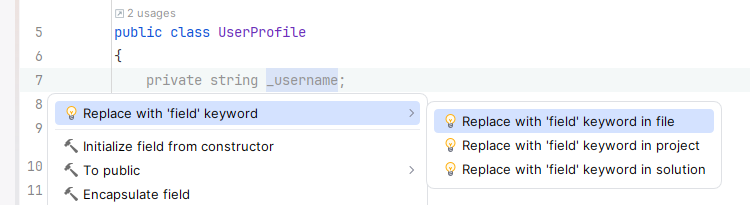
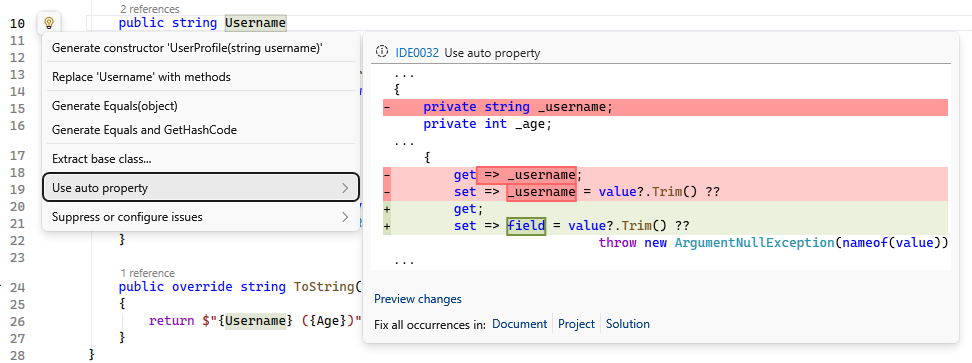
- Migrate incrementally: Start with properties needing validation or transformation, use your IDE’s refactoring tools
- Rider
- Visual Studio
- Rider
- Use property initializers for defaults: They can be more efficient than constructor assignments
- Apply field-targeted attributes: Maintain serialization and other behaviors
- Consider lazy initialization: Use
field ??=for expensive computations - Leverage ref parameters: Combine with
fieldfor efficient MVVM patterns
Conclusion
The C# 14 field keyword represents a significant quality-of-life improvement for C# developers. By eliminating explicit backing field declarations while preserving complete control over property behavior, it reduces code clutter and maintenance burden. Whether you’re implementing validation, lazy initialization, or MVVM patterns, the field keyword makes your code cleaner and more maintainable.
The smooth migration path from auto-implemented properties to properties with custom logic means you can start simple and add complexity only when needed. Combined with C# 14’s other features, the field keyword continues C#‘s evolution toward being more expressive while reducing boilerplate.
Start experimenting with the field keyword in your .NET 10 projects today, and enjoy writing cleaner, more maintainable property implementations.
Resources
What aspects of the field keyword are you most excited to use in your projects? Share your thoughts in the comments below!